

This article first appeared in Digital Edge, The Edge Malaysia Weekly on June 8, 2026 - June 14, 2026
The MSI Prestige 14 Flip AI+ is a laptop that feels polished and practical for everyday use. Flip the screen all the way back and it transforms into a tablet, complete with a bundled stylus that slots neatly beneath the device.
Targeted at business users and creatives, its flexibility makes it appealing to a broad audience. However, its jack-of-all-trades approach may leave heavier users such as content creators and streamers wanting more.
One of the Flip AI+’s biggest strengths is how premium it feels. The chassis is sturdy, well-built and free of any obvious compromises in materials.
Its 14in Full HD OLED display looks excellent in both laptop and tablet modes, even though it is not particularly bright. In well-lit environments, reflections, smudges and fingerprints become noticeable, an inevitable trade-off for a touchscreen designed for frequent use.
Powered by an Intel Core Ultra X7 processor, the laptop delivers fast, dependable performance for everyday work. Battery life is equally impressive, comfortably lasting a full workday under typical usage.
Even with dozens of browser tabs open alongside YouTube, Google Docs, email and Calendar, the system remained responsive with no noticeable slowdown.
Responsive touchscreen and useful stylus
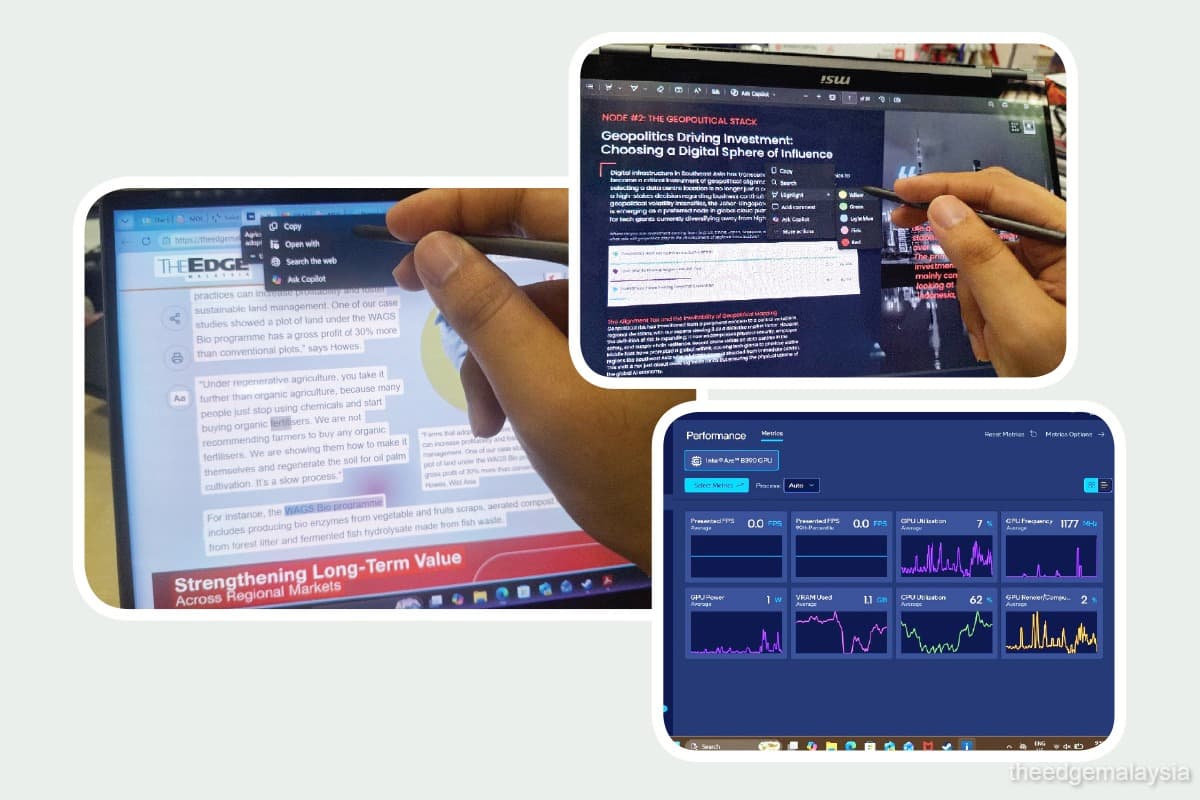
As a two-in-one device, the Flip AI+’s touchscreen performs as expected. Finger inputs are responsive for scrolling and navigation, but the display is clearly designed around the included Nano Pen. The stylus magnetically snaps into a slot beneath the keyboard and significantly improves the touchscreen experience. It supports AI-assisted features, such as highlighting text to send directly to Copilot for explanations or additional context.
For PDF work, the stylus made highlighting and annotations quick and intuitive. Flipping the device into portrait mode also made reading long documents more comfortable.
The Nano Pen performed well for writing and sketching. Handwriting recognition was roughly 85% accurate, while pressure sensitivity was sufficient for more detailed linework and basic shading.
Its main weakness is palm rejection. The touchscreen occasionally struggled to distinguish between the pen tip and a resting palm or wrist, resulting in unintended inputs during drawing or scrolling. The stylus is best used with the screen propped up rather than laid flat.
Mixed results for graphics-intensive workloads
One of the Flip AI+’s headline features is its appeal to creatives. Intel’s Graphics Software provides a comprehensive dashboard for creating performance profiles and monitoring frame rates and GPU usage in real time.
On paper, the specifications are promising. The laptop uses Intel’s Xe3 integrated graphics with 12 Xe cores and supports XeSS 3, the company’s AI-powered upscaling and frame-generation technology.
In theory, XeSS 3 should improve frame rates and visual quality in supported games. In practice, results were mixed.
Testing Marvel Rivals on relatively high settings produced underwhelming performance, while the generated frames often appeared unnatural. Under sustained loads, the cooling fan became noticeably loud and the area around the number keys grew uncomfortably warm.
Having said that, the issue may be less about hardware limitations and more about the technical knowledge needed to get the most from the system. Optimising graphics profiles, selecting the right XeSS settings and fine-tuning in-game options all require a degree of tinkering. For casual users, the gap between expectations and results could prove frustrating.
For business users who value strong battery life, responsive performance and the versatility of a laptop-tablet hybrid, the Flip AI+ is a dependable choice. Heavy users such as video editors, content creators and streamers may find it less convincing. While they may benefit more from XeSS 3, the heat and fan noise under heavier workloads make it a less comfortable long-term option.
Save by subscribing to us for your print and/or digital copy.
P/S: The Edge is also available on Apple's App Store and Android's Google Play.